Requests by QR
The doctor sends an imaging request with the clinical indication; the patient turns up with a token instead of a paper slip.
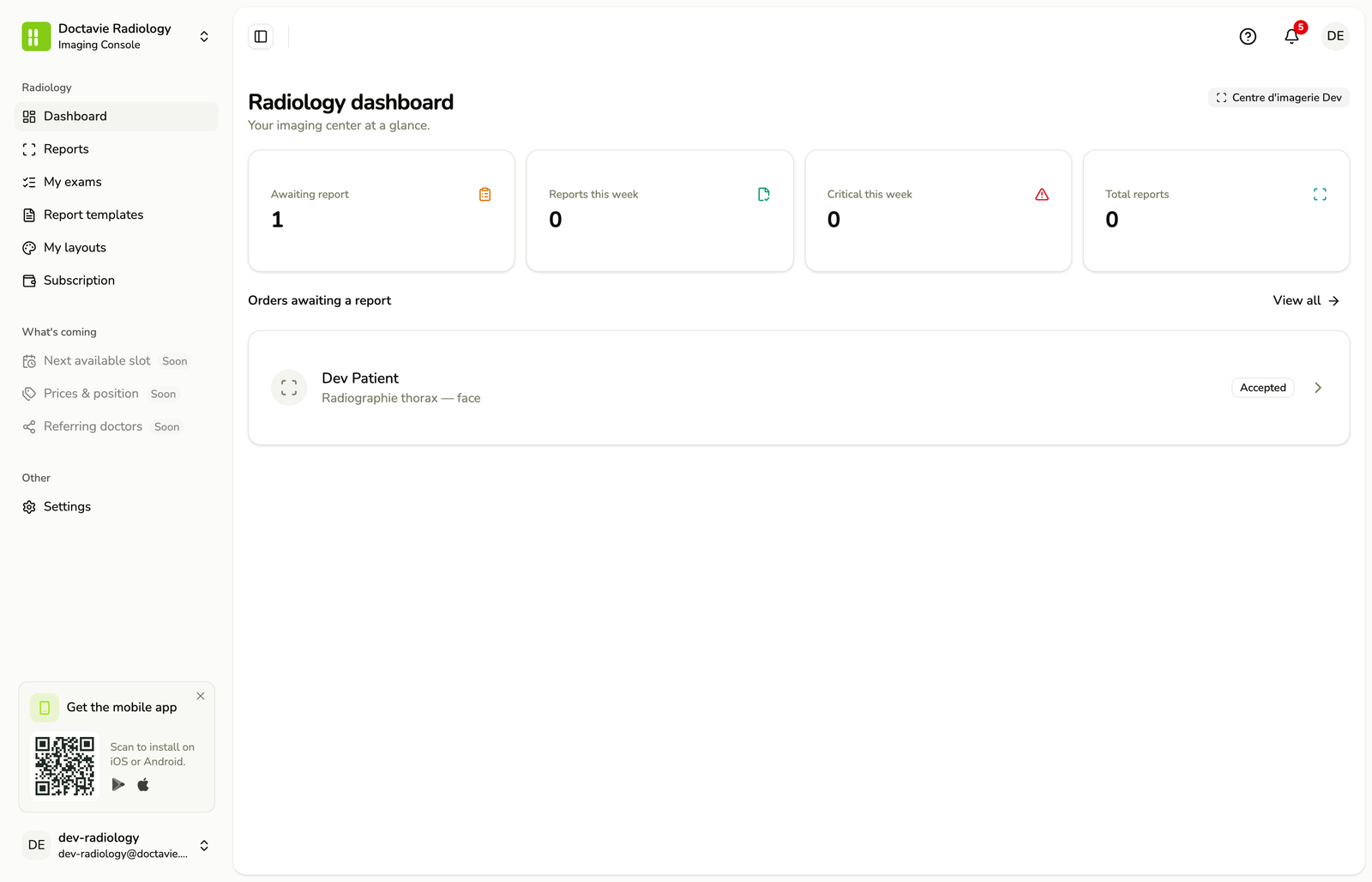
X-ray, CT, MRI and ultrasound requests arrive by QR. You issue a branded report, and the images open in the ordering doctor's browser — no CD to burn, no viewer to install, no "call us to find out what we saw".
An image without its report is a riddle; a report that never reaches the prescriber is lost. Today it travels on a CD nobody can open, or as a photo of a printout. Doctavie links the request, your centre and the record, so the read arrives where the decision gets made.



The doctor sends an imaging request with the clinical indication; the patient turns up with a token instead of a paper slip.
Publish your modalities and protocols — chest PA, abdominal CT with contrast, pelvic ultrasound — grouped by machine, with your prices.
Letterhead, report body, print layout: compose the template once and reuse it for every read.
DICOM studies read in the doctor's browser — windowing, measurements, slice scrolling — with no CD to burn and no software to install on their machine.
Register your team, licence and ID on file, verified before you go live.
The read enters the record and travels with the patient to the next doctor, in context with the rest of their history.
Per-machine scheduling, patient file, team, invoicing: what the centre kept in a daybook now lives in one imaging centre management console — the same one that sends the report and the images.
The CT, the MRI, the ultrasound, the X-ray room: each machine is a resource, and each resource has its own agenda. Two patients cannot be put on the same machine at the same hour — the database refuses the collision. Day, week or month; a booking moves by dragging it, and each carries its status: arrived, in progress, done, no-show.
Your opening hours and your closed days are entered once. Free slots are computed server-side from them, minus what is already booked: a slot you are offered is therefore a slot that exists.
The patient who turns up with a paper request and no account finally has a record with you: a roster searchable by name, and a file that gathers the exams you performed, the reports you issued, the bookings and what is still owed.
The owner invites colleagues by link and assigns a job — radiologist, manager, radiographer, front desk — approves the non-clinical seats themselves, suspends, removes. And only an owner or a verified practitioner may sign a report.
A gapless numbered series, per facility and per year. The invoice is frozen the moment it is issued and is corrected only by a credit note. Lines are priced from your own nomenclature, and payments — cash, card, transfer, cheque — are tracked against the balance.
Pregnancy, a pacemaker or metallic implant, contrast allergy, creatinine, claustrophobia, metal objects, weight: the questions are asked before the visit, and a risky answer flags the order on the worklist. Scanning a pregnant woman or injecting contrast into a patient in renal failure is not an inconvenience — it is harm.
“You wrote abdominal CT — with contrast?” The question goes to the prescriber, the answer comes back in writing and in real time, attached to the request. A notice can also go out to the patient, one way only.
What this is not: an acquisition console. Doctavie does not drive your machines and transmits nothing to CNAS. What it does: run the centre — appointments, patient file, team, invoicing — and send the report out with the images.
Submit your centre licence, your equipment list and your team's credentials.
List the modalities you offer and compose your report layout.
The patient shows their QR; the request opens with the indication and the prescriber already filled in.
Upload the study, write the read, and the report goes to the record and to the ordering doctor.
The phone is the front door. The Console is the back of house — the web workspace where doctors, pharmacists, laboratories, imaging centres and the platform team do the work that keeps the loop honest. No app store, no install: sign in and run your practice.
Every account is verified by hand before it goes live. Patients use the app — the Console is for the people who deliver care.
To close the paper daybook.
For the radiology practice and its team.
For the imaging centre and its teams.
Request, centre and record live on one ledger. The read you validate no longer has to survive a CD your colleague cannot open, or a printout photographed at an angle: they open the images in their browser, your report alongside, the same day.
“A report only really exists at the moment the doctor who ordered it reads it. The CD, the printout, the photo in a messaging app: all of them are ways of postponing that moment.
X-ray, CT, MRI and ultrasound, each with its own protocols and a report layout you control end to end.
No. The DICOM study opens in their browser, with windowing, measurements and slice scrolling. No CD to burn, no viewer to install.
The doctor orders; the request reaches the patient as a QR token they present at your front desk, with the clinical indication already filled in.
Sign up with your centre licence. Once verified, requests reach you by QR, and the starter plan is free.
For imaging centres
Requests arrive by QR, images and report go back together. The starter plan is free.